Server API enhancements
Centrifugo PRO extends the OSS server API with extra authentication options and request arguments. This page documents the additions; everything else (transport, base method semantics) is inherited from OSS unchanged.
JWKS authentication
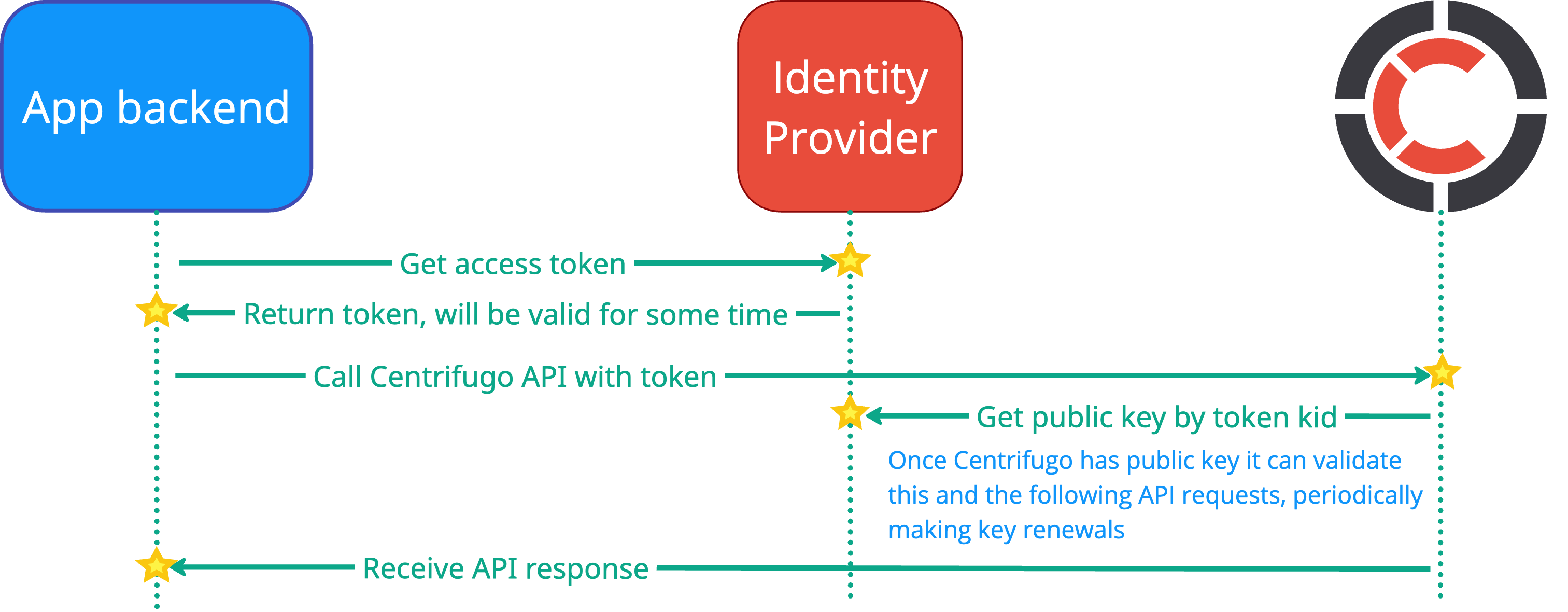
Centrifugo PRO supports protecting HTTP API and GRPC API with JWKS (JSON Web Key Set) based authentication. This allows you to use JWT tokens issued by your identity provider (like Keycloak, Auth0, or any other OIDC-compliant provider) to authenticate server API requests.
Overview
Instead of using the traditional API key authentication with X-API-Key header (for HTTP API) or metadata (for GRPC API), you can configure Centrifugo to validate JWT tokens signed by keys from a JWKS endpoint. This provides a more flexible and standardized way to protect your server API, especially when integrating with existing identity and access management systems.
The feature is available since Centrifugo PRO v6.3.2
Configuration
HTTP API
JWKS authentication is configured under the http_api.jwks section:
{
  "http_api": {
    "jwks": {
      "enabled": true,
      "endpoint": "https://keycloak.test.env/auth/realms/myrealm/protocol/openid-connect/certs",
      "audience": "https://centrifugo.test.env",
      "issuer": "https://keycloak.test.env/auth/realms/myrealm",
      "scope": "centrifugo:api"
    }
  }
}
GRPC API
JWKS authentication is configured under the grpc_api.jwks section:
{
  "grpc_api": {
    "enabled": true,
    "port": 10000,
    "key": "optional-api-key",
    "jwks": {
      "enabled": true,
      "endpoint": "https://keycloak.example.com/.well-known/jwks.json",
      "audience": "my-audience",
      "issuer": "https://keycloak.example.com",
      "scope": "centrifugo:api",
      "tls": {
        "enabled": true
      }
    }
  }
}
Configuration options
http_api.jwks.enabled / grpc_api.jwks.enabled
Boolean. Default: false.
Turns on JWKS authentication for HTTP API or GRPC API. When enabled, Centrifugo will validate JWT tokens from the Authorization: Bearer <TOKEN> header (for HTTP API) or from gRPC metadata (for GRPC API) against the JWKS endpoint.
http_api.jwks.endpoint / grpc_api.jwks.endpoint
String. Required when JWKS is enabled.
URL to fetch JWKS from. This is typically the OIDC provider's JWKS endpoint.
Examples:
- Keycloak:
https://keycloak.example.com/realms/myrealm/protocol/openid-connect/certs - Auth0:
https://YOUR_DOMAIN.auth0.com/.well-known/jwks.json - Custom OIDC provider:
https://identity.example.com/.well-known/jwks.json
http_api.jwks.audience / grpc_api.jwks.audience
String. Optional; when not set, audience check is skipped. It's recommended to set it.
The expected audience claim (aud) in the JWT token. This should match the audience configured in your identity provider for Centrifugo.
Example: https://centrifugo.test.env
http_api.jwks.issuer / grpc_api.jwks.issuer
String. Optional; when not set, issuer check is skipped. It's recommended to set it.
The expected issuer claim (iss) in the JWT token. This should match the issuer of tokens from your identity provider.
Example: https://keycloak.test.env/auth/realms/myrealm
http_api.jwks.scope / grpc_api.jwks.scope
String. Optional.
The required scope claim in the JWT token. If set, Centrifugo will verify that the token contains this scope. The scope claim can be either a string or an array of strings in the JWT.
Example: centrifugo:api
http_api.jwks.tls / grpc_api.jwks.tls
Unified TLS object. Optional.
TLS configuration for HTTPS connection to JWKS endpoint. Use this if your JWKS endpoint requires custom TLS settings, such as custom CA certificates or client certificates.
Usage
HTTP API
Once JWKS authentication is configured, API clients need to provide a valid JWT token in the Authorization header when making HTTP API requests:
curl --header "Authorization: Bearer <JWT_TOKEN>" \
  --request POST \
  --data '{"channel": "chat", "data": {"text": "hello"}}' \
  http://localhost:8000/api/publish
Example with httpie:
echo '{"channel": "chat", "data": {"text": "hello"}}' | \
  http POST "http://localhost:8000/api/publish" \
  "Authorization: Bearer <JWT_TOKEN>"
GRPC API
For GRPC API, clients need to provide the JWT token in the gRPC metadata with the authorization key:
authorization: Bearer <JWT_TOKEN>
The exact implementation depends on your gRPC client library. Here's an example using Go:
import (
    "context"
    "google.golang.org/grpc"
    "google.golang.org/grpc/metadata"
)

// Create context with authorization metadata
md := metadata.New(map[string]string{
    "authorization": "Bearer " + token,
})
ctx := metadata.NewOutgoingContext(context.Background(), md)

// Make GRPC API call with authenticated context
response, err := client.Publish(ctx, &api.PublishRequest{
    Channel: "chat",
    Data:    []byte(`{"text": "hello"}`),
})
JWKS caching, refresh and rotation
Centrifugo automatically caches the JWKS keys fetched from the endpoint to avoid making a request on every API call. The cache is periodically refreshed to pick up key rotations performed by your identity provider.
Combining with API key authentication
JWKS authentication can be used alongside API key authentication provided by Centrifugo OSS. If both http_api.key and http_api.jwks are configured (or grpc_api.key and grpc_api.jwks), Centrifugo PRO will accept requests authenticated with either method:
{
  "http_api": {
    "key": "my-api-key",
    "jwks": {
      "enabled": true,
      "endpoint": "https://keycloak.test.env/auth/realms/myrealm/protocol/openid-connect/certs",
      "audience": "https://centrifugo.test.env",
      "issuer": "https://keycloak.test.env/auth/realms/myrealm"
    }
  },
  "grpc_api": {
    "enabled": true,
    "port": 10000,
    "key": "my-api-key",
    "jwks": {
      "enabled": true,
      "endpoint": "https://keycloak.test.env/auth/realms/myrealm/protocol/openid-connect/certs",
      "audience": "https://centrifugo.test.env",
      "issuer": "https://keycloak.test.env/auth/realms/myrealm"
    }
  }
}
This can be useful during migration from API key to JWKS authentication, or when you need to support both authentication methods simultaneously.
Example: Keycloak integration
Here's a complete example of integrating Centrifugo HTTP API and GRPC API with Keycloak:
-
Configure Keycloak client:
- Create a client in Keycloak with client authentication enabled
- Set valid redirect URIs
- Add a custom scope
centrifugo:api - Note the JWKS endpoint URL from realm settings
-
Configure Centrifugo:
{
  "http_api": {
    "jwks": {
      "enabled": true,
      "endpoint": "https://keycloak.example.com/auth/realms/myrealm/protocol/openid-connect/certs",
      "issuer": "https://keycloak.example.com/auth/realms/myrealm",
      "scope": "centrifugo:api"
    }
  },
  "grpc_api": {
    "enabled": true,
    "port": 10000,
    "jwks": {
      "enabled": true,
      "endpoint": "https://keycloak.example.com/auth/realms/myrealm/protocol/openid-connect/certs",
      "issuer": "https://keycloak.example.com/auth/realms/myrealm",
      "scope": "centrifugo:api"
    }
  }
}
- Obtain a token from Keycloak (usually this is done by your backend service):
TOKEN=$(curl -X POST "https://keycloak.example.com/auth/realms/myrealm/protocol/openid-connect/token" \
  -H "Content-Type: application/x-www-form-urlencoded" \
  -d "client_id=myclient" \
  -d "client_secret=mysecret" \
  -d "grant_type=client_credentials" \
  -d "scope=centrifugo:api" \
  | jq -r '.access_token')
- Use the token with Centrifugo HTTP API (usually this is done by your backend service):
curl --header "Authorization: Bearer $TOKEN" \
  --request POST \
  --data '{"channel": "chat", "data": {"text": "hello"}}' \
  https://centrifugo.example.com/api/publish
- Use the token with Centrifugo GRPC API (usually this is done by your backend service):
md := metadata.New(map[string]string{
    "authorization": "Bearer " + token,
})
ctx := metadata.NewOutgoingContext(context.Background(), md)

response, err := client.Publish(ctx, &api.PublishRequest{
    Channel: "chat",
    Data:    []byte(`{"text": "hello"}`),
})
Targeted ops by client labels
The subscribe, unsubscribe, disconnect, and refresh server-API methods accept two optional arguments for client-label-based targeting:
label_filter— aFilterNodepredicate matched againstClient.Labels. Same expression language as the server tags filter — operatorseq,neq,in,nin,ex,nex,sw,ew,ct,gt,gte,lt,lte,and,or,not. The difference vs.server_tags_filteris the subject:server_tags_filtermatches publication tags;label_filtermatches connection labels.all_users— boolean. Changes the meaning of an emptyuserfrom "anonymous-user bucket only" to "every connection on every node." No effect whenuseris non-empty. Required to act fleet-wide on labels alone.
How user, all_users, and label_filter interact
user | all_users | Target set |
|---|---|---|
"alice" | any | Alice's connections (existing behavior; all_users ignored). |
"" | false | Anonymous-user bucket only (existing behavior — backward compatible). |
"" | true | Every connection across the cluster, narrowed by label_filter if set. |
label_filter, client, and session always act as additive narrowers within the chosen target set. A connection must satisfy every set criterion to be affected.
label_filter are destructive{"all_users": true} with no label_filter will disconnect / refresh / subscribe / unsubscribe every connection in the cluster. Use only for planned operations (maintenance evacuation, incident response). Log audits will show the call without a filter — make sure your monitoring catches it.
Examples
Fleet-wide: disconnect all EU pro-tier users
curl --header "X-API-Key: <API_KEY>" \
  --request POST \
  --data '{
    "all_users": true,
    "label_filter": {
      "op": "and",
      "nodes": [
        {"key": "region", "cmp": "eq", "val": "eu"},
        {"key": "tier", "cmp": "eq", "val": "pro"}
      ]
    }
  }' \
  http://localhost:8000/api/disconnect
Fleet-wide: refresh every client running a deprecated app version
curl --header "X-API-Key: <API_KEY>" \
  --request POST \
  --data '{
    "all_users": true,
    "expired": true,
    "label_filter": {"key": "app_version", "cmp": "in", "vals": ["1.0.0", "1.1.0"]}
  }' \
  http://localhost:8000/api/refresh
Fleet-wide: server-side subscribe every pro-tier connection to a feature channel
curl --header "X-API-Key: <API_KEY>" \
  --request POST \
  --data '{
    "all_users": true,
    "channel": "pricing:v2",
    "label_filter": {"key": "tier", "cmp": "eq", "val": "pro"}
  }' \
  http://localhost:8000/api/subscribe
Per-user: narrow within one user's connections
When you know the user, leave all_users off and use label_filter as an additive narrower:
curl --header "X-API-Key: <API_KEY>" \
  --request POST \
  --data '{
    "user": "user42",
    "channel": "chat:lobby",
    "label_filter": {
      "op": "and",
      "nodes": [
        {"key": "platform", "cmp": "eq", "val": "desktop"},
        {"key": "app_version", "cmp": "lt", "val": "3.0.0"}
      ]
    }
  }' \
  http://localhost:8000/api/unsubscribe
Maintenance evacuation: disconnect everything
curl --header "X-API-Key: <API_KEY>" \
  --request POST \
  --data '{
    "all_users": true,
    "disconnect": {"code": 4000, "reason": "scheduled maintenance"}
  }' \
  http://localhost:8000/api/disconnect
Performance
Fleet-wide ops iterate every shard's full connection table on every node. For deployments with tens of thousands of connections per node, this is O(N) work per call — single call site, no label index. Prefer narrower scoping (user, or per-tenant channels) when the same query can be expressed that way. Reach for all_users + label_filter when label-based targeting is the genuine intent or for one-shot operational actions.
Cluster behavior: a fleet-wide op is fanned out via the control protocol — every receiving node runs the same hub-iteration filter locally. Mixed-version clusters (during rolling upgrade) safely degrade: older nodes that don't know all_users interpret it as false and run the anonymous-only path on their share. Bump every node before relying on fleet-wide semantics in production.
Connections listing with label_filter
The connections admin API supports label_filter as a fleet-wide selector without needing all_users. Listings go through a per-node survey across the entire hub. The snapshot creation endpoint also accepts label_filter and applies it at gather time — see Connections API for the details.
Grouped publications
New in Centrifugo PRO v6.9.7
Centrifugo PRO sends publications to the broker in groups instead of one by one. This works with Redis and Memory engines and is enabled by default.
- Single publications – server API
publishover HTTP and GRPC, publications from async consumers, client-side publications (including ones going through the publish proxy), andbroadcastinto one channel. When Centrifugo is not busy, each publication goes to the broker right away, as before. Under load, when two sends to the broker are already in progress, a new publication waits for one of them to finish, and all publications waiting by then go out together. A publication waits for this no longer than 250 microseconds. - Server API requests with many publications –
broadcastinto several channels andbatch, sequential or parallel. The request hands its publications to the broker together, without waiting for other requests. With Redis, they reach Redis in a few pipelined calls, each covering many publications, instead of one command per publication. In a batch, only publish commands next to each other are handed over together: another command between them splits them, and runs only after the publications written before it. For a broadcast, Centrifugo PRO also does not start a separate goroutine for each channel.
Each call returns after its own publication is sent, so publications made one after another keep their order.
Grouping reduces CPU usage of Centrifugo and Redis, and the latency of batch requests. See Faster publishing for more details.
What changes for applications
Order between channels. Publications of one channel always take effect in the order they were written. A sequential batch no longer waits for one publication before starting the next, so publications to different channels may be applied in another order. Centrifugo never guaranteed that order to subscribers: with Redis, publications coming back from Redis are processed concurrently, spread by channel name, so a client subscribed to both channels could receive them in another order even before.
Errors. Mostly unchanged: as before, an error may come after a publication was written, so use idempotency_key to make retries safe. Publications which share one Redis call share its outcome, so a problem with one channel's Redis keys may fail the other publications in that call too.
To get the previous behavior back for a namespace, use publication_grouping_disabled described below.
publication_grouping_disabled
A channel namespace option. When true, every publication into channels of the namespace is sent to the broker on its own, whichever API it comes from – as before grouping existed. In a sequential batch such a command is published alone and in its place, so publications are written to Redis in the order of the batch. In a broadcast such channels are published one by one, each with its own result.
{
  "channel": {
    "namespaces": [
      {
        "name": "ledger",
        "publication_grouping_disabled": true
      }
    ]
  }
}
publication_grouping_max_delay
A channel namespace option, a duration, zero by default. When set, a single publication into the namespace waits up to this long for other publications to join it, or until the group is full. This groups more publications at moderate load and saves more CPU of Centrifugo and Redis, at the cost of latency: every single publication waits up to the delay. A few hundred microseconds, like 250us, is a reasonable start.
{
  "channel": {
    "namespaces": [
      {
        "name": "chat",
        "publication_grouping_max_delay": "250us"
      }
    ]
  }
}
The delay applies to single publications only: batches, and broadcasts into several channels, never wait. It can be set only for namespaces using Redis or Memory engines, and can not be combined with publication_grouping_disabled.
Client commands of one connection are processed one by one unless client.concurrency is set, so with the delay a client's next command waits for its delayed publication.
How much gets grouped
With Redis, publications are always sent to Redis in a pipeline. How many publications may share a single Redis call depends on the setup:
- A single Redis instance: publications to many channels may share a call.
- Redis Cluster with sharded PUB/SUB: publications to channels of the same partition may share a call.
- Redis Cluster without sharded PUB/SUB: a call only carries publications of one channel, so the gain is smaller.
- Redis history based on lists (
history_use_lists): each publication with history is a separate call.
Other brokers (like NATS or PostgreSQL) do not group publications: single publications are sent one by one, and publications of a batch or a broadcast are sent as concurrent single publishes – so the note about order between channels still applies to them, with little performance gain.
See also
- Client labels — how to attach labels via JWT or connect proxy.
- Server tags filter — sibling FilterNode-based feature for per-publication tag filtering.
- Connections API — the PRO
connectionslisting endpoint and snapshot endpoints.