Switching to a two-column layout
Back in the App layout and behavior chapter we promised that our design keeps the door open for a Telegram/Slack-style two-column layout – the room list on the left, the open room on the right – and that switching to it would be "just a change of React component arrangement and some CSS". Let's cash that promise in. It's also the clearest illustration of why we gave every user a single personal channel.
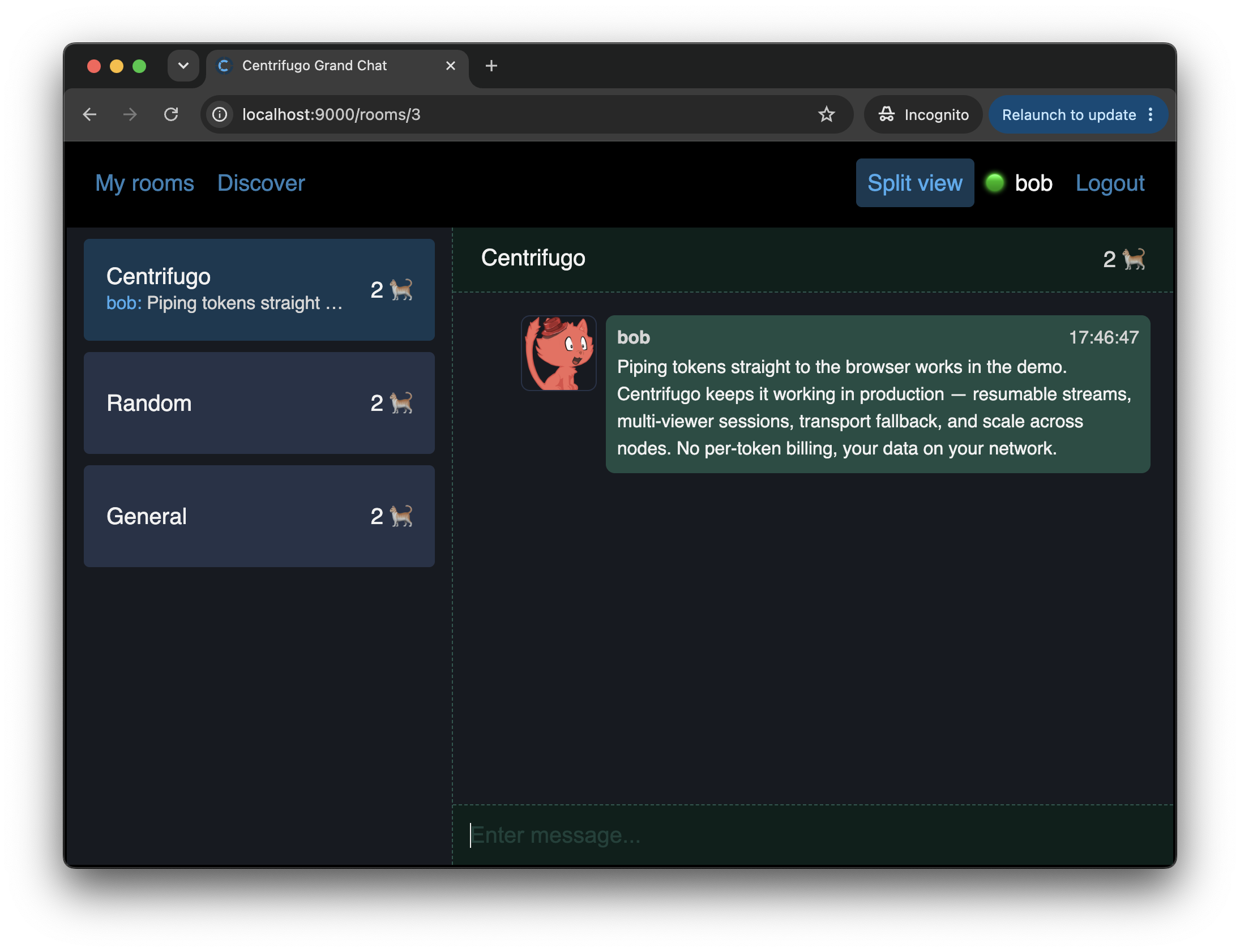
Why this is almost free
In our app, all rooms and messages live in one shared chat state, and that state is fed by a single subscription to the user's personal channel. The room list and an open room are simply two views over that same live state. So to show them side by side we just render both at once – and because everything flows through one WebSocket connection, both panes stay in sync in real time automatically.
This is exactly the thing a channel-per-room design struggles with: to keep a sidebar of rooms updating while you read one of them, you'd have to be subscribed to every room at the same time. With our approach a user can belong to hundreds or thousands of rooms and still receive updates for all of them over one connection – so the same data is already in the client, ready to render however we like.
A toggle in the navbar
We add a button to the navbar that flips a twoColumn flag, stored in LocalStorage so the choice survives reloads:
<button id="layout-toggle" className={twoColumn ? 'active' : ''} onClick={onToggleColumns} title="Toggle two-column layout">
  Split view
</button>
Arranging the columns
The only real change is where we place the screens we already have. In single-column mode we render the routed screen as before. In two-column mode we render the room list in a persistent sidebar and the routed screen in a main pane beside it:
const screens = (
  <Routes>
    <Route path="/" element={twoColumn ? <div id="chat-room-placeholder">Select a room to start chatting</div> : <ChatRoomList />} />
    <Route path="/search" element={<ChatSearch fetchRoom={fetchRoom} />} />
    <Route path="/rooms/:id" element={<ChatRoomDetail /* ...props */ />} />
  </Routes>
)

// ...rendered inside ChatLayout:
{twoColumn ? (
  <div id="chat-columns">
    <div id="chat-sidebar"><ChatRoomList /></div>
    <div id="chat-main">{screens}</div>
  </div>
) : (
  screens
)}
The important point: we reuse the very same ChatRoomList, ChatRoomDetail and ChatSearch components – none of them change. In two-column mode the list lives in the sidebar, so the / route just shows a small "select a room" placeholder instead of the list again.
To highlight the open room in the sidebar we switch its link from Link to NavLink, which adds an active-room class when its route is active:
<NavLink to={`/rooms/${room.id}`} className={({ isActive }) => isActive ? 'active-room' : ''}>
Everything else is a handful of flexbox rules in index.css (#chat-columns, #chat-sidebar, #chat-main) – check the source for the exact styles.
The payoff
Turn on "Split view", open a room, and have a second user send messages from another browser tab. The open room updates, the room's last-message preview and ordering in the sidebar update, and member counters across the whole list update – all at once, all from a single WebSocket subscription. That's the design decision from the very first chapters, finally made visible.