Client JWT authentication
To authenticate incoming connection (client) Centrifugo can use JSON Web Token (JWT) passed from the client-side. This way Centrifugo may know the ID of user in your application, also application can pass additional data to Centrifugo inside JWT claims. This chapter describes this authentication mechanism.
If you prefer to avoid using JWT then look at the proxy feature. It allows proxying connection requests from Centrifugo to your application backend endpoint for authentication details.
Using JWT auth can be nice in terms of massive reconnect scenario. Since authentication information is encoded directly in the token this may help to drastically reduce load on your application session backend. See in our blog post.
Upon connecting to Centrifugo client should provide a connection JWT with several predefined credential claims. Here is a diagram:
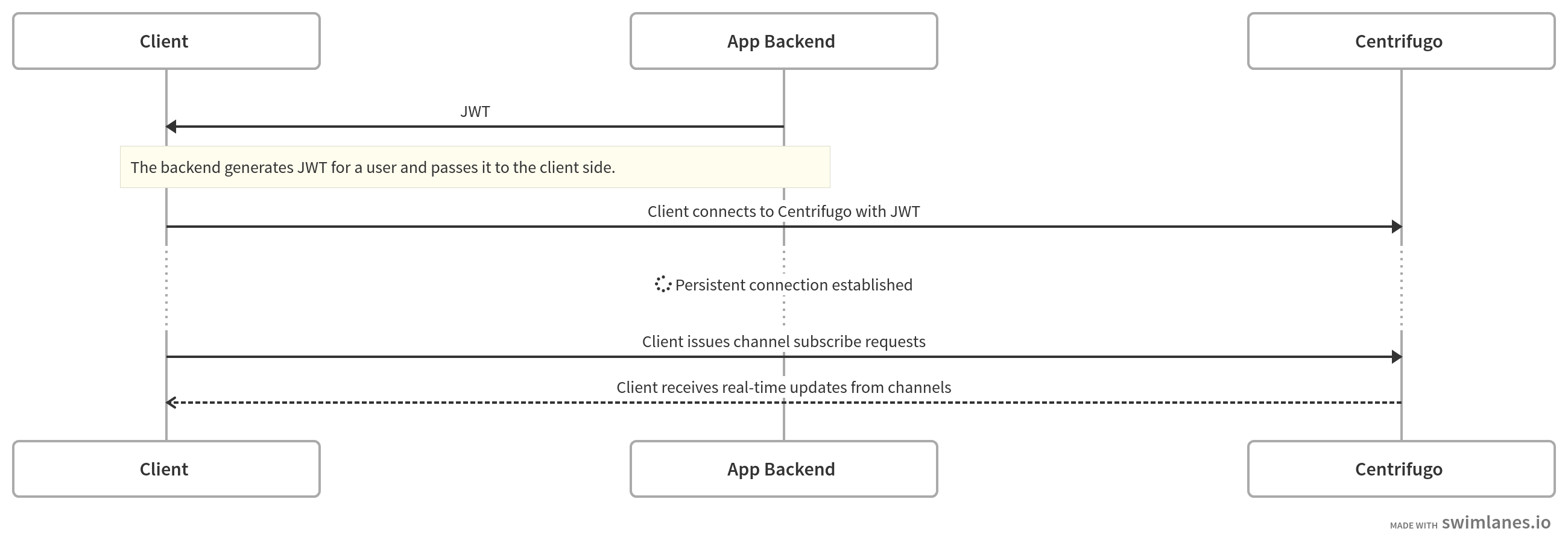
At the moment Centrifugo supports HMAC, RSA and ECDSA JWT algorithms - i.e. HS256, HS384, HS512, RSA256, RSA384, RSA512, EC256, EC384, EC512.
We will use Javascript Centrifugo client here for example snippets for client-side and PyJWT Python library to generate a connection token on the backend side.
To add HMAC secret key to Centrifugo add token_hmac_secret_key to configuration file:
{
    ...
    "token_hmac_secret_key": "<YOUR-SECRET-STRING-HERE>"
}
To add RSA public key (must be PEM encoded string) add token_rsa_public_key option, ex:
{
    ...
    "token_rsa_public_key": "-----BEGIN PUBLIC KEY-----\nMFwwDQYJKoZ..."
}
To add ECDSA public key (must be PEM encoded string) add token_ecdsa_public_key option, ex:
{
    ...
    "token_ecdsa_public_key": "-----BEGIN PUBLIC KEY-----\nxyz23adf..."
}
Connection JWT claims
For connection JWT Centrifugo uses the some standart claims defined in rfc7519, also some custom Centrifugo-specific.
sub
This is a standard JWT claim which must contain an ID of the current application user (as string).
If a user is not currently authenticated in an application, but you want to let him connect to Centrifugo anyway – you can use an empty string as a user ID in sub claim. This is called anonymous access. In this case, you may need to enable corresponding channel namespace options which enable access to protocol features for anonymous users.
exp
This is a UNIX timestamp seconds when the token will expire. This is a standard JWT claim - all JWT libraries for different languages provide an API to set it.
If exp claim is not provided then Centrifugo won't expire connection. When provided special algorithm will find connections with exp in the past and activate the connection refresh mechanism. Refresh mechanism allows connection to survive and be prolonged. In case of refresh failure, the client connection will be eventually closed by Centrifugo and won't be accepted until new valid and actual credentials are provided in the connection token.
You can use the connection expiration mechanism in cases when you don't want users of your app to be subscribed on channels after being banned/deactivated in the application. Or to protect your users from token leakage (providing a reasonably short time of expiration).
Choose exp value wisely, you don't need small values because the refresh mechanism will hit your application often with refresh requests. But setting this value too large can lead to slow user connection deactivation. This is a trade-off.
Read more about connection expiration below.
iat
This is a UNIX time when token was issued (seconds). See definition in RFC. This claim is optional but can be useful together with Centrifugo PRO token revocation features.
jti
This is a token unique ID. See definition in RFC. This claim is optional but can be useful together with Centrifugo PRO token revocation features.
aud
By default, Centrifugo does not check JWT audience (rfc7519 aud claim).
But you can force this check by setting token_audience string option:
{
  "token_audience": "centrifugo"
}
Setting token_audience will also affect subscription tokens (used for channel token authorization). Please read this issue and reach out if your use case requires separate configuration for subscription tokens.
iss
By default, Centrifugo does not check JWT issuer (rfc7519 iss claim).
But you can force this check by setting token_issuer string option:
{
  "token_issuer": "my_app"
}
Setting token_issuer will also affect subscription tokens (used for channel token authorization). Please read this issue and reach out if your use case requires separate configuration for subscription tokens.
info
This claim is optional - this is additional information about client connection that can be provided for Centrifugo. This information will be included in presence information, join/leave events, and channel publication if it was published from a client-side.
b64info
If you are using binary Protobuf protocol you may want info to be custom bytes. Use this field in this case.
This field contains a base64 representation of your bytes. After receiving Centrifugo will decode base64 back to bytes and will embed the result into various places described above.
channels
An optional array of strings with server-side channels to subscribe a client to. See more details about server-side subscriptions.
subs
An optional map of channels with options. This is like a channels claim but allows more control over server-side subscription since every channel can be annotated with info, data, and so on using options.
This claim is called subs as a shortcut from subscriptions. The claim sub described above is a standart JWT claim to provide a user ID (it's a shortcut from subject). While claims have similar names they have different purpose in a connection JWT.
Example:
{
  ...
  "subs": {
    "channel1": {
      "data": {"welcome": "welcome to channel1"}
    },
    "channel2": {
      "data": {"welcome": "welcome to channel2"}
    }
  }
}
Subscribe options:
| Field | Type | Optional | Description |
|---|---|---|---|
| info | JSON object | yes | Custom channel info |
| b64info | string | yes | Custom channel info in Base64 - to pass binary channel info |
| data | JSON object | yes | Custom JSON data to return in subscription context inside Connect reply |
| b64data | string | yes | Same as data but in Base64 to send binary data |
| override | Override object | yes | Allows dynamically override some channel options defined in Centrifugo configuration on a per-connection basis (see below available fields) |
Override object
| Field | Type | Optional | Description |
|---|---|---|---|
| presence | BoolValue | yes | Override presence |
| join_leave | BoolValue | yes | Override join_leave |
| position | BoolValue | yes | Override position |
| recover | BoolValue | yes | Override recover |
BoolValue is an object like this:
{
  "value": true/false
}
meta
Meta is an additional JSON object (ex. {"key": "value"}) that will be attached to a connection. Unlike info it's never exposed to clients inside presence and join/leave payloads and only accessible on a backend side. It may be included in proxy calls from Centrifugo to the application backend (see proxy_include_connection_meta option). Also, there is a connections API method in Centrifugo PRO that returns this data in the connection description object.
expire_at
By default, Centrifugo looks on exp claim to configure connection expiration. In most cases this is fine, but there could be situations where you wish to decouple token expiration check with connection expiration time. As soon as the expire_at claim is provided (set) in JWT Centrifugo relies on it for setting connection expiration time (JWT expiration still checked over exp though).
expire_at is a UNIX timestamp seconds when the connection should expire.
- Set it to the future time for expiring connection at some point
- Set it to
0to disable connection expiration (but still check tokenexpclaim).
Connection expiration
As said above exp claim in a connection token allows expiring client connection at some point in time. Let's look in detail at what happens when Centrifugo detects that the connection is going to expire.
First, you should do is enable client expiration mechanism in Centrifugo providing a connection JWT with expiration:
import jwt
import time

token = jwt.encode({"sub": "42", "exp": int(time.time()) + 10*60}, "secret").decode()

print(token)
Let's suppose that you set exp field to timestamp that will expire in 10 minutes and the client connected to Centrifugo with this token. During 10 minutes the connection will be kept by Centrifugo. When this time passed Centrifugo gives the connection some time (configured, 25 seconds by default) to refresh its credentials and provide a new valid token with new exp.
When a client first connects to Centrifugo it receives the ttl value in connect reply. That ttl value contains the number of seconds after which the client must send the refresh command with new credentials to Centrifugo. Centrifugo clients must handle this ttl field and automatically start the refresh process.
For example, a Javascript browser client will send an AJAX POST request to your application when it's time to refresh credentials. By default, this request goes to /centrifuge/refresh URL endpoint. In response your server must return JSON with a new connection JWT:
{
    "token": token
}
So you must just return the same connection JWT for your user when rendering the page initially. But with actual valid exp. Javascript client will then send them to Centrifugo server and connection will be refreshed for a time you set in exp.
In this case, you know which user wants to refresh its connection because this is just a general request to your app - so your session mechanism will tell you about the user.
If you don't want to refresh the connection for this user - just return 403 Forbidden on refresh request to your application backend.
Javascript client also has options to hook into a refresh mechanism to implement your custom way of refreshing. Other Centrifugo clients also should have hooks to refresh credentials but depending on client API for this can be different - see specific client docs.
Examples
Let's look at how to generate connection HS256 JWT in Python:
Simplest token
- Python
- NodeJS
import jwt

token = jwt.encode({"sub": "42"}, "secret").decode()

print(token)
var jwt = require('jsonwebtoken');

var token = jwt.sign({ sub: '42' }, 'secret');

console.log(token);
Note that we use the value of token_hmac_secret_key from Centrifugo config here (in this case token_hmac_secret_key value is just secret). The only two who must know the HMAC secret key is your application backend which generates JWT and Centrifugo. You should never reveal the HMAC secret key to your users.
Then you can pass this token to your client side and use it when connecting to Centrifugo:
var centrifuge = new Centrifuge("ws://localhost:8000/connection/websocket", {
  token: token
});
centrifuge.connect();
See more details about working with connection tokens and handling token expiration on the client-side in the real-time SDK API spec.
Token with expiration
HS256 token that will be valid for 5 minutes:
- Python
- NodeJS
import jwt
import time

claims = {"sub": "42", "exp": int(time.time()) + 5*60}
token = jwt.encode(claims, "secret", algorithm="HS256").decode()
print(token)
var jwt = require('jsonwebtoken');

var token = jwt.sign({ sub: '42' }, 'secret', { expiresIn: 5 * 60 });

console.log(token);
Token with additional connection info
Let's attach user name:
- Python
- NodeJS
import jwt

claims = {"sub": "42", "info": {"name": "Alexander Emelin"}}
token = jwt.encode(claims, "secret", algorithm="HS256").decode()
print(token)
var jwt = require('jsonwebtoken');

var token = jwt.sign({ sub: '42', info: {"name": "Alexander Emelin"} }, 'secret');

console.log(token);
Investigating problems with JWT
You can use jwt.io site to investigate the contents of your tokens. Also, server logs usually contain some useful information.
JSON Web Key support
Centrifugo supports JSON Web Key (JWK) spec. This means that it's possible to improve JWT security by providing an endpoint to Centrifugo from where to load JWK (by looking at kid header of JWT).
A mechanism can be enabled by providing token_jwks_public_endpoint string option to Centrifugo (HTTP address).
As soon as token_jwks_public_endpoint set all tokens will be verified using JSON Web Key Set loaded from JWKS endpoint. This makes it impossible to use non-JWK based tokens to connect and subscribe to private channels.
Read a tutorial in our blog about using Centrifugo with Keycloak SSO. In that case connection tokens are verified using public key loaded from the JWKS endpoint of Keycloak.
At the moment Centrifugo caches keys loaded from an endpoint for one hour.
Centrifugo will load keys from JWKS endpoint by issuing GET HTTP request with 1 second timeout and one retry in case of failure (not configurable at the moment).
Only RSA algorithm is supported.
Once enabled JWKS used for both connection and channel subscription tokens.
Dynamic JWKs endpoint
Available since Centrifugo v4.1.3
It's possible to extract variables from iss and aud JWT claims using Go regexp named groups, then use variables extracted during iss or aud matching to construct a JWKS endpoint dynamically upon token validation. In this case JWKS endpoint may be set in config as template.
To achieve this Centrifugo provides two additional options:
token_issuer_regex- match JWT issuer (issclaim) against this regex, extract named groups to variables, variables are then available for jwks endpoint construction.token_audience_regex- match JWT audience (audclaim) against this regex, extract named groups to variables, variables are then available for jwks endpoint construction.
Let's look at the example:
{
  "token_issuer_regex": "https://example.com/auth/realms/(?P<realm>[A-z]+)",
  "token_jwks_public_endpoint": "https://keycloak:443/{{realm}}/protocol/openid-connect/certs",
}
To use variable in token_jwks_public_endpoint it must be wrapped in {{ }}.
When using token_issuer_regex and token_audience_regex make sure token_issuer and token_audience not used in the config - otherwise and error will be returned on Centrifugo start.
Setting token_issuer_regex and token_audience_regex will also affect subscription tokens (used for channel token authorization). Please read this issue and reach out if your use case requires separate configuration for subscription tokens.